
Summary
In this blog, I will explain my first experience with Software AG’s Cumulocity IoT platform and how to use this platform in combination with some open-source technologies. This blog shows you, how easy it is to set up generally available IoT devices, sensors, and communication protocols such that you can apply them in more complex environments. I will use an example to set up and control processes in a factory. I also created a tutorial on Github. If you want, you can follow the instructions to build it yourself. It’s fun! Check out the README here.
background of the example project
To monitor and control processes (in factories), there are many solutions available in the market. They work fine in most cases, but there are some disadvantages with these smart devices/sensors. Some of these devices are not compatible or not open for integrations with other devices, so you need different systems or different dashboards to operate them and interpret the data coming from the sensors.
Wouldn’t it be nice if you could build something yourself, combining the output of the devices and see this output and control the devices from one dashboard? And how about an easy-to-use platform to help you monitor the processes?
This blog and the tutorial on Github describe how to do that, using Cumulocity and opensource technologies and using relatively inexpensive devices and sensors.
Although this solution to monitor processes in a factory might not be an enterprise-ready solution, but it does show you how easy it is to use any device.
Example project
There is a factory using gasses in one of their processes to create raw materials for plastics industries. The process is influenced by direct sunlight and air humidity.
Sunlight and air humidity are also related, if there is much sunlight, the temperature goes up and this is of influence of the humidity.
So the influence of humidity, direct sunlight is important for the process.
Sometimes during the process, storage tanks and valves are opened and closed. Because of that sometimes an amount of gas will be released. If the intensity of gas gets too high, it can be dangerous.
That is why this process is being monitored in real-time in different ways. If there is an incident, warnings and alarms can be given and actions will be taken automatically.
Architecture
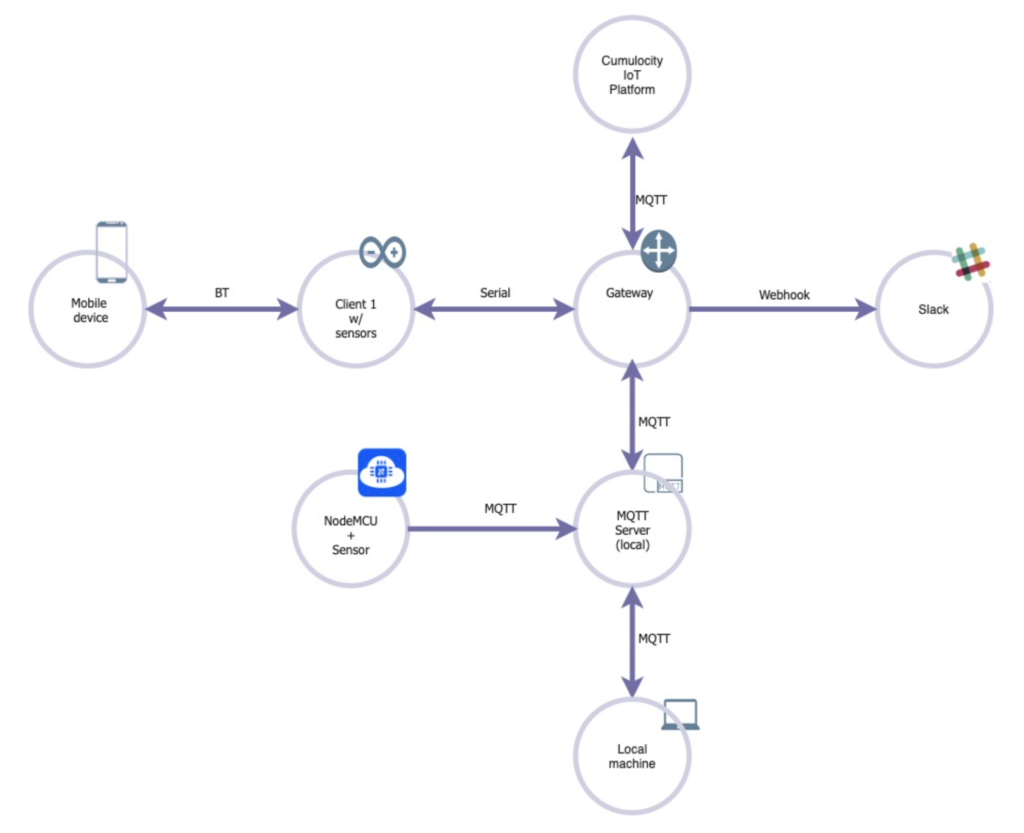
The gateway is the heart of the system. This device receives all data from the other devices and sends this to Cumulocity, where it is displayed on a dashboard in real-time. The gateway also receives commands from Cumulocity to send it to the devices. The connection between the Gateway and Cumulocity is using the MQTT protocol.
There are 2 devices with sensors:
NodeMCU, this device has only one sensor (humidity) and is connected to the gateway via MQTT as well. I have set up a local MQTT server to connect some of the local devices.
Client 1 has 3 sensors (light, humidity and gas) that send their data via serial to the gateway. This device has also 2 actuators (relay and fan) which can be controlled by sending commands to this device, for instance from Cumulocity.
The mobile device is connected with Bluetooth to Client1 to interact with the process if there is an incident and there is no wifi and internet connection anymore.
Also, the local machine is connected to the system via MQTT. This local machine is running an extra dashboard to monitor and control the process when there is no internet connection.
All warnings and alarms are also being sent to Slack via a webhook, to inform people involved, like process operators.
Tutorial
On Github you find the instructions on how to implement the above architecture. This instruction expects that you have some knowledge about working with devices. There is also a list of devices included if you don’t have all the devices on the list, you can of course also use different devices, or uses fewer devices.
As an example, the MQTT server can also be combined with the gateway. Or even run the gateway and MQTT server on your local machine. But if you have access to more devices, you can connect them as well.
Possibilities are endless!
Ready to get started? Check out the README [[Link to github ] for the details.
Some remarks on the example project
As you can see, I created different dashboards: In Cumulocity, on the local machine and on a mobile device (this is not a dashboard but it is possible to interact with the process from here, like start/stop actuators). You might think it is too much, but something can happen during an incident, like problems with the internet or network connection. Then you might not be able to see in the Cumulocity dashboard what is going on. Therefore, I created different ways to monitor the process and the possibility to interact.
You also might think, a factory with such an important or critical process, will never use devices as I used. A factory would use devices and sensors/actuators which are much more robust and stable and have a high degree of reliability. I totally agree with that. But as I don’t own any industrial devices, I used the ones I described. But industrial devices can be used in similar ways, maybe there are some slight changes, but in general, connecting to Cumulocity and using the data they produce are pretty much similar. Here is an overview of partner devices and how you can connect them.
This demo of the system to control the process is not finished yet of course. It can be optimized in various ways:
More sensors can be added in different places in the factory and also different sensors which are more accurate to measure what you want. This data coming from those sensors can be combined to make predictions in the future. You can also add other information, like weather data. With all this data you can create a model to predict when it is better to turn on ventilation and close the sun protection. This is just an example, there are many ways to improve and optimise the process based on data.
Also, the code and the Node-RED flows on the devices should be optimised to make the process more efficient.
Recap
I learned a lot about Cumulocity, it is easy to use. In no time you connect a device without going through any difficulties. The documentation is perfect, all you need is in there and written in a very clear way. That helped me get started quickly. But it also helped me using additional features of Cumulocity.
I believe providing good documentation and investing in it (keeping it up to date, etc.) is part of the usage of a product
Also, the different ways to connect with the platform is important. I used MQTT with NodeRED (which was very straightforward). There are many examples of how to use different languages in combination with MQTT. But you can also directly connect with Rest and there is an SDK for C++ available.
Again the documentation is very clear and helpful on this. All the examples can also be found on Github.
If you want to add extra functionality to the platform you can add microservices to it. To create and use those microservices, a lot of languages are available and some are even with an SDK.
It is also possible to do analytics on the data, there is a built-in possibility to do analytics on the data streams. I did not use it (yet) but there is a tool available where you can build your analytic models. In the extended documentation, you will find some examples but also some best practices which can be very useful. A step further is Machine Learning. Cumulocity provides 2 applications, one for creating ML models and one engine to deploy these models. Again, the documentation consists of clear information on how to use it and gives some examples as well.
This was my first ‘encounter’ with Cumulocity IoT and, as you can read, I am very positive and I really enjoyed working with it.
Links
Some useful links:
Start here, here you’ll find general info about the platform and information on how to start
Getting Started – Cumulocity IoT Guides
You can create a free trial account here:
Some general information:
Cumulocity IoT (softwareag.com)
Device Catalog – Cumulocity IoT Connect
IoT and Integration (softwareag.cloud)